
Well, the time has come for me to start aggresively looking for new employment opportunities. If anyone has any leads, please contact me. My resume is posted on this site, and I will be updating it shortly. In a nutshell, I’m a .NET developer, and am open to any ideas.
Day: October 19, 2006
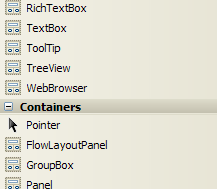 I’m sure this is something I could fix given some time with my good friend Google, but time is something I don’t have a lot of, and the problem isn’t really that serious — just annoying.
In a nutshell, the icons in my Toolbox (VS 2005, not SP1) are “messed up” — they’re all the same icon (see picture on right). Does anyone have any suggestions for fixing this? Especially suggestions that won’t cause me to lose other non-default settings I have changed?
Update: It’s only happening on WinForms apps (web apps are OK), and it is only on three of the control groups in the toolbox: “All Windows Forms”, “Common Controls”, and “Containers”.